Certwatch: a read-only inventory for the certificates your Vault already issued
Vault and OpenBao make issuing certificates easy. They don’t make it easy to answer the next three questions: what did we issue, who owns it, and what expires next week?
In 26 years of build and release work, there was no tracking — you noticed a cert when users did. Fire drill, then a hero, then a Confluence page created so it never happens again. Everyone’s happy, and then the page is forgotten until the next outage.
The PKI API will tell you, one serial at a time. LIST pki/certs returns serial numbers. To learn anything useful, you read each certificate, parse it, and repeat that for every mount, namespace, and cluster. So most teams end up with a cron script, a spreadsheet, or an outage. The commercial answer is a certificate lifecycle platform. That’s a lot of product if you already have a CA and just want visibility into it.
Certwatch is the small thing in between.
What it does
You give it a dedicated read-only token or AppRole for your existing Vault or OpenBao clusters. It syncs on startup and every 10 minutes after that:
- Lists and reads every certificate the configured PKI mounts still enumerate, parses the X.509, and stores it in SQLite.
- Shows everything in a dense operator UI. You can filter, sort by expiry, open any cert, and export CSV or JSON.
- Assigns owners, either per cert or with CN glob rules like
*.payments.internal→ Payments SRE. - Alerts to Slack or a generic webhook at 30 days (warning) and 7 days (critical). Alerts fire on state change, not on every sync, so each destination gets one warning and one critical per cert, not a message every ten minutes.
- Lints the PKI setup. It flags roles with
allow_any_name, wildcards, TTLs over 90 days, issuers expiring within 60 days,no_storeroles, and roots that look like they were generated inside Vault. - Exposes Prometheus gauges and health endpoints.
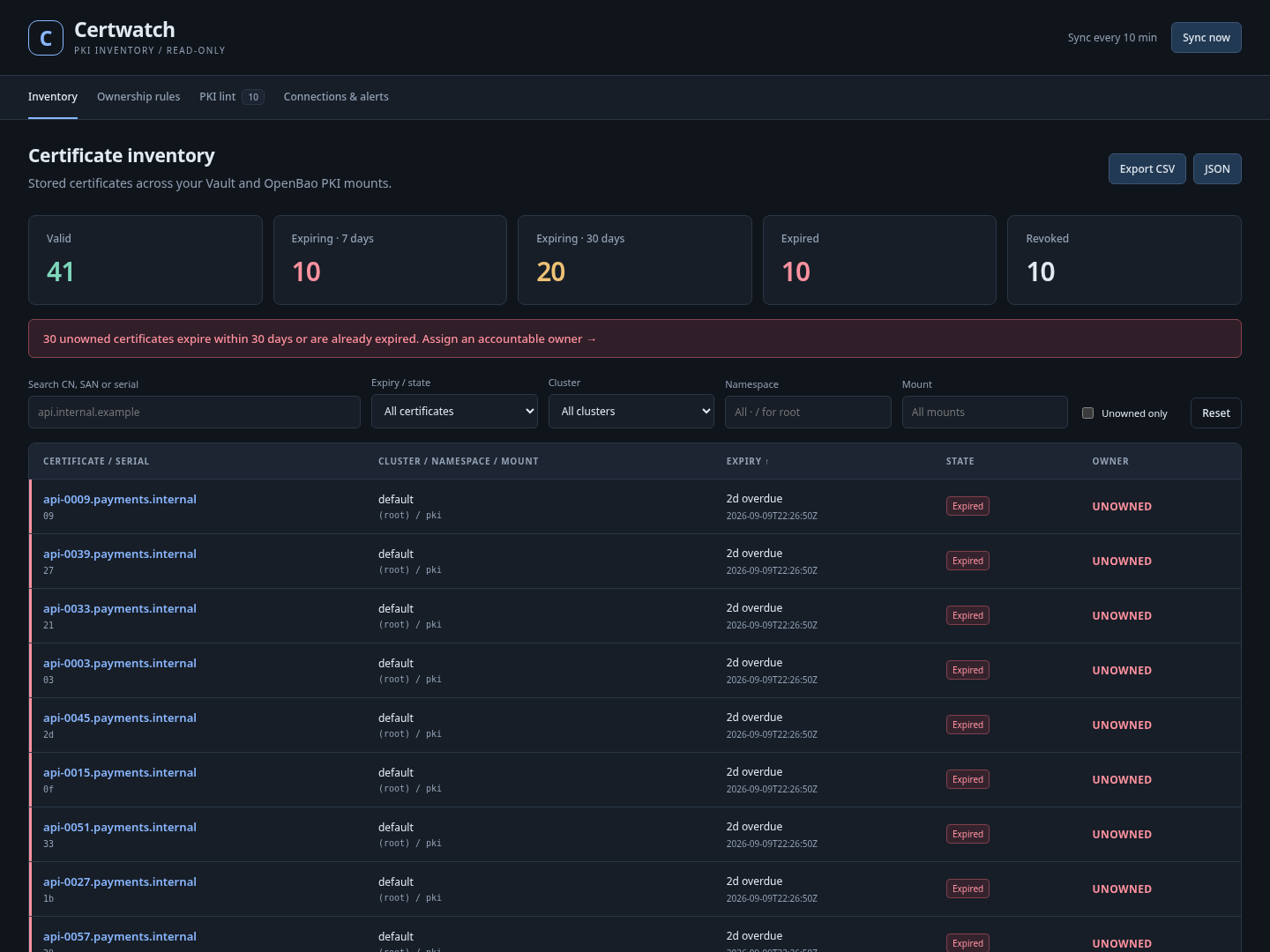
Rendered from test-fixture data, not a real inventory.
It’s one Go binary with an embedded UI and SQLite, shipped as one non-root Docker image. There are no Go module dependencies, no frontend build chain, and no Kubernetes. Setup is task init, two values in .env, then task up.
What it deliberately doesn’t do
This is the part I’d want to read first, so here it is plainly.
It is not a CA. It never issues, renews, or revokes anything. The only thing it writes to Vault is its own login.
It only sees what Vault can still list. Certificates from no_store=true roles are invisible. Certificates tidied before the first sync are gone. Certwatch flags no_store roles so you know where the blind spots are, but it can’t recover history that isn’t there.
One cluster is not your whole fleet. Performance-replicated secondaries don’t necessarily share stored certificate records. Every issuing cluster has to be configured, or it isn’t covered.
A cert in Vault is not a cert in production. There’s no network scanning, host discovery, or endpoint checking. “Valid” means date-valid and not revoked as of the last read. It does not mean deployed and serving.
No recovery notifications. When a cert is renewed, its alert state clears quietly. The loop closes in the UI, not in Slack. Expired certs stay critical, and there’s no second page at the moment of expiry.
Auth is a single shared Basic-auth operator login. There’s no SSO, RBAC, or per-user audit trail. Put it behind your own TLS reverse proxy.
These aren’t a roadmap. Most of them are the boundary.
How far it’s been tested
The full Docker Compose path has run against HashiCorp Vault 2.1.1 and OpenBao 2.6.2 in dev mode, with identical results. The transcripts are in docs/verification/. It has not been run against Vault Enterprise, a real replicated topology, a real Slack workspace, or production-scale inventory.
What I’m asking for
I need one person running Vault or OpenBao PKI to point Certwatch at a real cluster and tell me what broke. Non-prod is fine. Setup should take about ten minutes. If it takes longer, that’s the bug report.
Open an issue on the repo, and tell me what happened.
Repo: github.com/bigelow/certwatch, Apache 2.0.